Guide, updated 2026-10-29
Can ChatGPT read my site? How to find out in 2 minutes
For ChatGPT to show your site in an answer, three things have to hold: your robots.txt does not block its search crawler, no CDN or firewall shuts the door on it, and the text is in the HTML your server delivers. Here are the steps, in the order worth checking them.
Step 1. Run the free check
Enter your domain in the free Atalaya check. It applies 20 AI crawler tokens to your robots.txt the way the crawlers read it and shows the line that decides each case. For ChatGPT, the one that matters is OAI-SearchBot, the search crawler. GPTBot is for training and ChatGPT-User is for visits a person asks for; our guide to OpenAI's crawlers explains the difference.
Step 2. Read the robots.txt rules
Open yoursite.com/robots.txt. Look for a group that names OAI-SearchBot, and if there is none, look at the User-agent: * group. A crawler follows the most specific group that names it (RFC 9309); if none names it, the general one applies. A Disallow: / in the general group, which many sites add to slow all bots, also shuts out OAI-SearchBot.
This is more common than it looks. In our study of 751 popular sites (October 2026), 59% of the Mexican sites that opt out of training also block at least one AI search crawler. In a follow-up on 2026-10-29, of the Mexican sites that block an AI search crawler, 62% do it only through User-agent: *, without naming it: probably a side effect, not a decision. The sample is small (26 reachable Mexican sites) and robots.txt may have changed since.
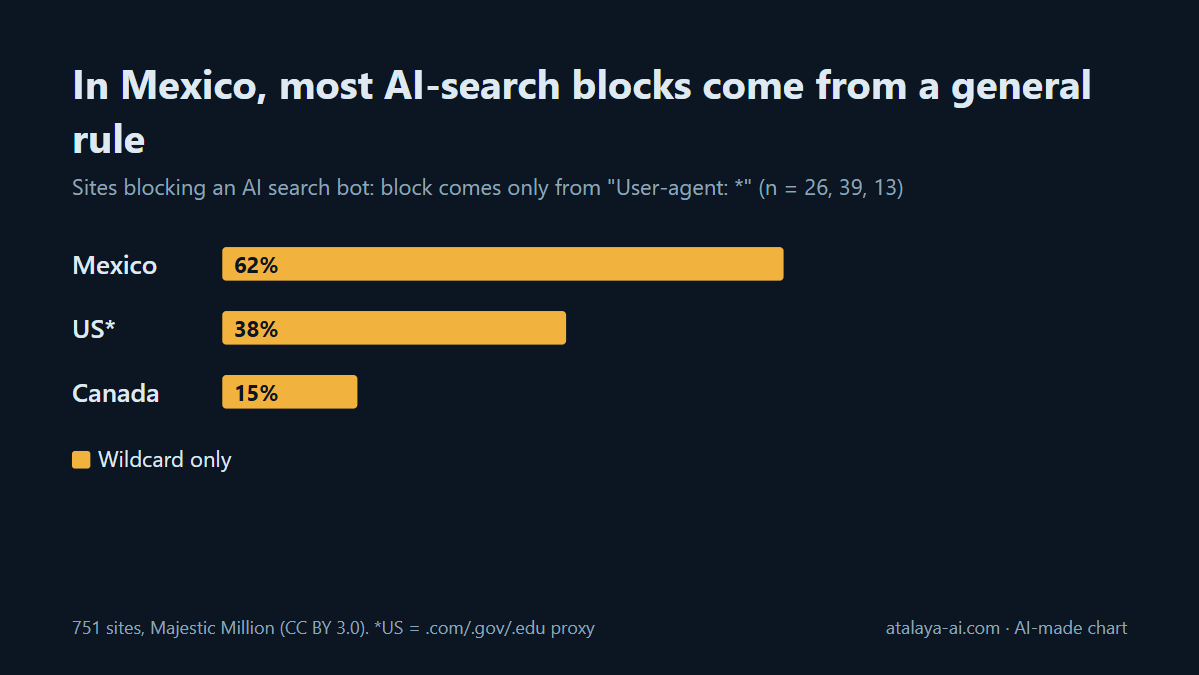
User-agent: *. Source: Atalaya, 751 sites, 2026-10-29.The fix is to name OAI-SearchBot with Allow: /, as in the OpenAI guide.
Step 3. Check llms.txt, without expecting miracles
Open yoursite.com/llms.txt. It is a community proposal, and no AI vendor has confirmed that it uses it for ranking or citations. It costs little, but it does not replace robots.txt; the llms.txt guide has the format.
Step 4. Look for Cloudflare or CDN blocks
Blocks set in a CDN, firewall or bot-protection service happen before robots.txt is read. Your file can say yes while the server answers 403. If you use Cloudflare, our Cloudflare guide lists the five places where the block usually sits. OpenAI also recommends allowing OAI-SearchBot's published IP addresses. Our check does not see this layer, so a clean result does not rule it out.
Step 5. Confirm the text is in the HTML
Open your page, choose "View page source" and search for a sentence from your content. If it is not there because the page is built with JavaScript in the browser, a crawler that only reads HTML may not see it. For stores, Can AI read your products? walks through this check.
FAQ
Which crawler does ChatGPT need to show my site in its search answers?
OAI-SearchBot. OpenAI says sites that opt out of it are not shown in ChatGPT search answers, though they can still appear as navigational links.
My robots.txt allows ChatGPT but it still cannot read my site. Why?
It can happen. A CDN, firewall or bot-protection service can answer with a 403 before robots.txt is read. See step 4.
Do I need an llms.txt for ChatGPT to read my site?
No. No AI vendor has confirmed that it uses llms.txt for ranking or citations. Fix robots.txt first.
Sources
What we attribute to OpenAI comes from OpenAI Crawlers, read on 2026-10-29. The numbers are from our study: samples of 300 domains per country from the Majestic Million (CC BY 3.0), robots.txt and llms.txt only, no view of CDN blocks.
Check your site
Written with AI. If you spot an error, write to hola@atalaya-ai.com.